Workflows / Reporting

Email Performance Report

Campaign results live in a dashboard nobody opens.

Every MondayGmailGoogle Sheets

How It Runs

TRIGGEREvery Monday At 8LOGICConfigSHEETRead EventsSHEETRead SubscribersLOGICBuild ReportGMAILEmail The Report

Steps

  1. Every Monday At 8Trigger
  2. ConfigLogic
  3. Read EventsSheet
  4. Read SubscribersSheet
  5. Build ReportLogic
  6. Email The ReportGmail

Control Sheet Tabs

EventsSubscribers

Accounts To Connect

GmailGoogle Sheets

Run It Yourself

n8n

  1. In n8n, open Workflows, then Import from URL
  2. Paste https://raw.githubusercontent.com/archanacontent/content-marketing-automation-workflows/main/n8n/17-email-performance-report.json
  3. Fill in the Config node and connect the accounts listed above
  4. Activate the workflow

Google Apps Script

  1. Set up the control sheet with the steps on the main page
  2. Runs on its own: Monday at 8:00
  3. To run it now, open the Run tab and tick Run now next to No. 17

Real Output

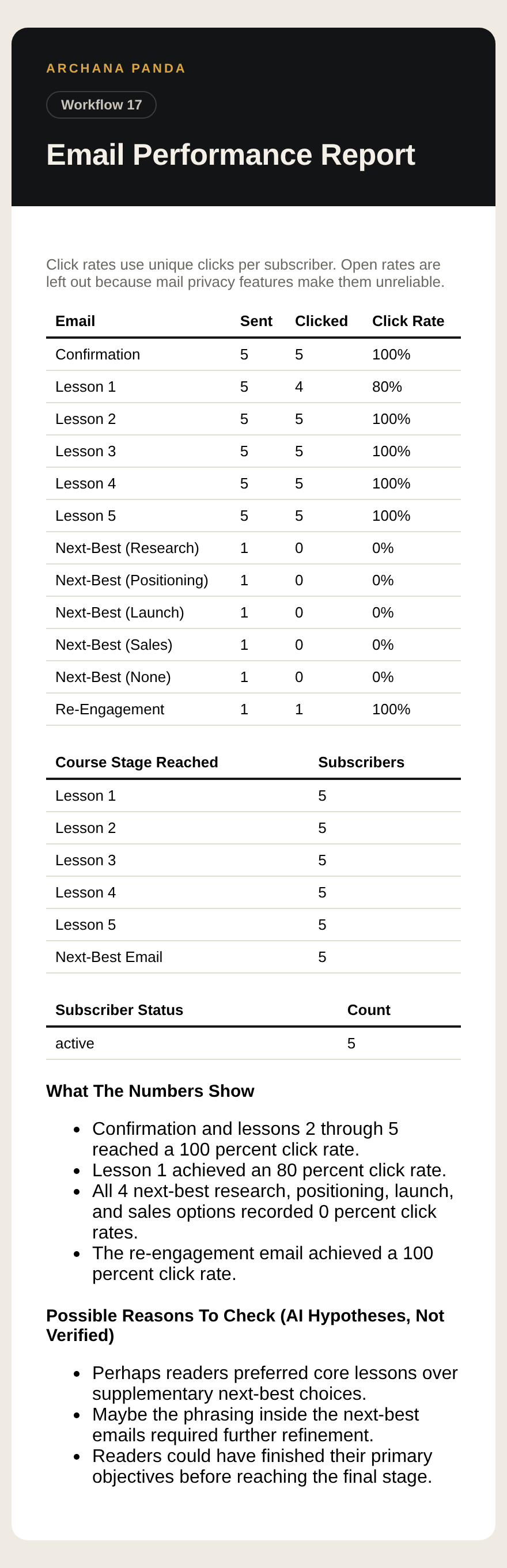
Output from Email Performance Report, page 1